
Skip to content

Vulnerability management for developer endpoints

Find vulnerable software on every developer Mac.

Runtrace checks installed developer tools and project packages against public security advisories. It shows what is affected, which Macs need attention, and how to confirm the fix.

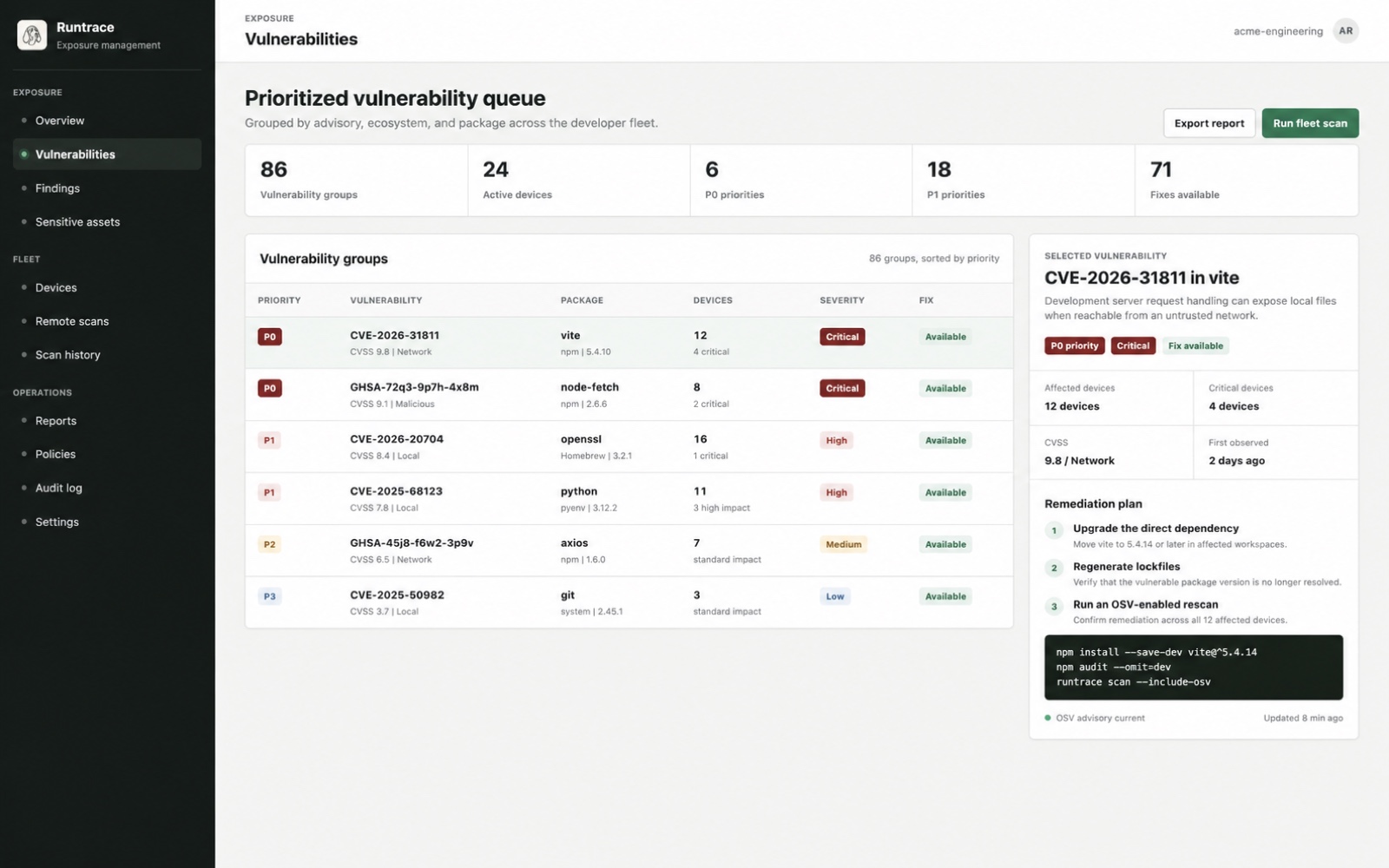
Prioritized vulnerability queueExample workspace
Runtrace vulnerability dashboard grouping affected Macs by advisory, package, severity, priority, and available fix
Illustrative fleet data

What Runtrace covers

Installed software
Homebrew packages, global language tools, and standalone command-line applications on each Mac.
Project dependencies
Package metadata from manifests and lockfiles, without treating the files themselves as security findings.
Fleet exposure
Known vulnerabilities grouped by package and affected Mac, with the available fix and a confirmation scan.

Repositories are only part of the picture

Know what developers actually have installed.

Repository scanners inspect code stored in services such as GitHub. Runtrace also checks command-line tools, package-manager installs, local binaries, and project packages that are present on the Mac itself.

See what Runtrace checks

How Runtrace works

Find the issue, decide what matters, and confirm the fix.

Security teams see the impact across the company. Developers get the affected package, the version to install, and a clear way to check that the issue is gone.

  1. Step 1

    See what is installed

    Record package names and versions from enrolled Macs without uploading source code or file contents.

  2. Step 2

    Check known issues

    Compare each exact version with the Open Source Vulnerabilities database and other public advisory records.

  3. Step 3

    Decide what comes first

    Combine duplicate alerts and raise issues that affect more Macs, important devices, or software known to be exploited.

  4. Step 4

    Confirm the fix

    Assign an owner, install a safe version, and scan again to confirm that the affected version is no longer present.

One issue, one decision

Stop sorting through the same alert from every Mac.

Runtrace combines the same advisory and package into one item. You can see how many Macs are affected, whether important devices are involved, and whether a safe version is available.

See how priority is calculated
Grouped vulnerabilitySecurity advisory affecting vite
P0
Affected Macs12
Critical devices4
CVSS9.8
Fixed version5.4.14
Remediation plan
  1. Upgrade the affected package.
  2. Update the project's locked versions.
  3. Run a confirmation scan.
npm install --save-dev vite@^5.4.14

Controlled remote verification

Ask a Mac to scan again without taking remote control.

An admin chooses a scan type and records why it is needed. The agent checks the request, runs when the Mac is online, and returns only the structured security result.

Example scan request
Scan
Developer tools and project packages
Reason
Confirm the vite update
Safety limit
4,000 files per selected folder
  • 01No remote shell or arbitrary commands
  • 02One active scan per Mac
  • 03Selected folders and fixed limits
  • 04Requests expire automatically

Security and privacy

Know what the agent collects before you deploy it.

Review the data boundary, remote scan controls, prioritization model, and current service status in plain language.

Runtrace Business

See which developer Macs need attention.

Tell us how many Macs you manage and how your team installs software. We will show you the product using a rollout that fits your environment.

Request a demoView pricing